Task: Basic Linux Commands

Introduction: In this blog, we will explore some fundamental Linux commands that are essential for any aspiring Linux user or developer. We'll go through various tasks to understand how to perform file operations, manipulate permissions, view command history, create and edit files, and compare file contents. So, let's dive into the world of Linux and get started!
Task 1: To view what's written in a file.
Command: cat filename
Description: The cat command is used to concatenate and display the content of a file on the terminal.

Task 2: To change the access permissions of files.
Command: chmod permissions filename
Description: The chmod command is used to change the access permissions (read, write, execute) of a file or directory.
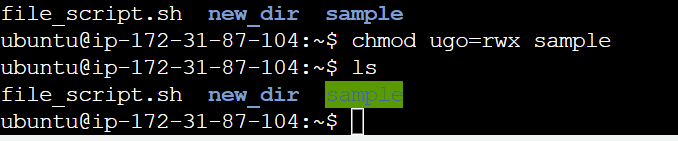
Symbolic Representation: One of the way to set permissions using letters.
u: Ownerg: Groupo: Othera: All (equivalent tougo)
To grant read and write permissions to the owner and read-only access to the group and others, you would use chmod u=rw,g=r,o=r filename.
for example: before modifying permissions sample is in blue color and after giving all permissions it changes to gree color.
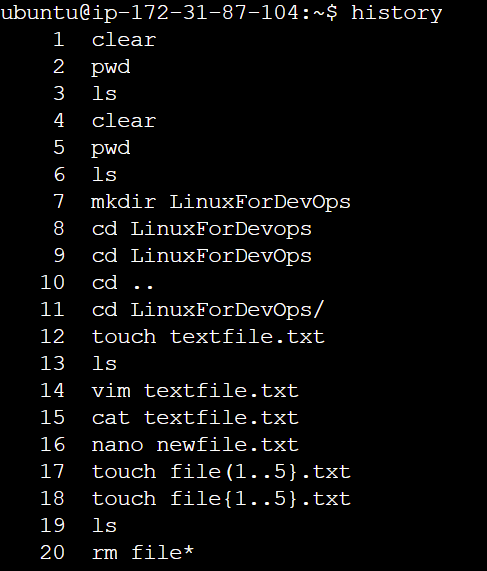
Task 3: check which commands you have run till now.
Description: The history command displays the list of commands executed in the current session.
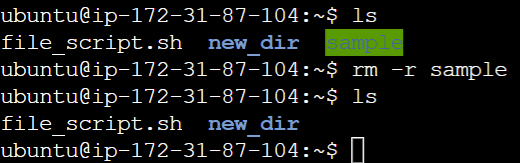
Task 4: Remove a directory/folder
Command: rm -r directory_name
Description: The rm command is used to remove files or directories. The -r option is used to recursively remove a directory.
Task 5: Create a fruits.txt file and view the content.
Description: We first create a file named fruits.txt using the touch command and then view content to it using the cat command.

Task 6: Add content in devops.txt (One in each line) - Apple, Mango, Banana, Cherry, Kiwi, Orange, Guava.
Command: echo -e "Apple\nMango\nBanana\nCherry\nKiwi\nOrange\nGuava" > devops.txt
Description: We use the "echo" command to add delightful fruits to the "devops.txt" file.
Task 7: To Show only the top three fruits from the file.
Command: head -n 3 fruits.txt
Description: The "head" command showcases the first three lines of "fruits.txt".
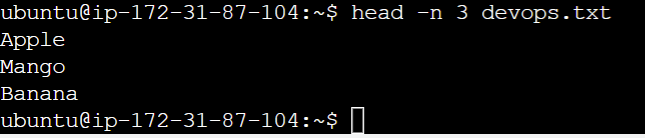
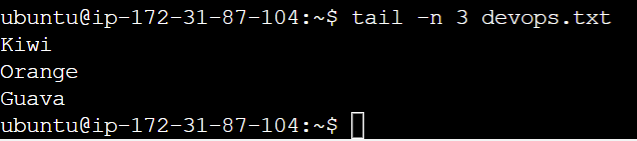
Task 8:To Show only the bottom three fruits from the file.
Command: tail -n 3 fruits.txt
Description: The "tail" command displays the last three lines of "fruits.txt".
Task 9: To create another file Colors.txt and view the content.
Description: We first create a file named Colors.txt uses the touch command and then view content to it using the cat command.

Task 10: Add content in Colors.txt (One in each line) - Red, Pink, White, Black, Blue, Orange, Purple, Grey.
Command: echo -e "Red\nPink\nWhite\nBlack\nBlue\nOrange\nPurple\nGrey" > Colors.txt
Description: We use the "echo" command to add Colors to the "Colors.txt" file.

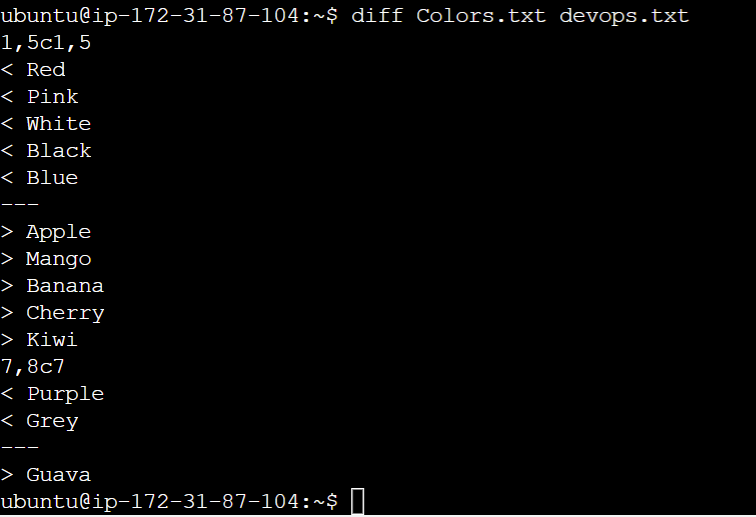
Task 11: To find the difference between devops.txt and Colors.txt file.
Command: diff devops.txt Colors.txt
Description: The "diff" command helps you identify discrepancies between "fruits.txt" and "Colors.txt".
Conclusion: In this blog, we've covered some basic Linux commands and demonstrated how to perform essential file operations, manipulate permissions, view command history, create and edit files, and compare file contents. These commands serve as a foundation for further exploration of the Linux operating system and can be immensely helpful in your journey as a Linux user or developer. Happy learning!


