Basic Linux Shell Scripting for DevOps Engineers

Shell Scripting for DevOps
A shell is a special user program that acts as an interface between users and the operating system, providing a way for users to interact with the system and utilize its services. It serves as a command language interpreter, taking human-readable commands entered by the user through input devices like keyboards or files and translating them into instructions that the operating system kernel can understand and execute.
The shell is typically launched when a user logs in or starts a terminal session. Once active, it waits for commands to be entered by the user. These commands can be simple tasks like navigating the file system, creating directories, or copying files, or they can be more complex operations such as running programs, managing processes, or configuring system settings.
Examples of Shell Scripting in DevOps:
Automated Deployment: A shell script can be used to automate the deployment process of a web application. It can pull the latest code from the version control system (e.g., Git), build the application, copy the necessary files to the web server, restart the server, and perform any other required configurations.
Continuous Integration: DevOps teams often use continuous integration (CI) pipelines to automatically build, test, and deploy code changes. Shell scripts can be incorporated into the CI pipeline to execute these tasks, enabling seamless integration of new code into the existing codebase.
Infrastructure Provisioning: Shell scripts can automate the setup and configuration of servers and cloud resources. For example, a script can be written to create and configure virtual machines on a cloud provider like AWS, set up security groups, attach storage volumes, and install the required software.
Log Analysis and Monitoring: Shell scripts can be utilized to parse and analyze log files generated by applications, allowing DevOps teams to identify and address issues proactively. For instance, a script could monitor log files for specific error patterns and notify the team via email or a messaging platform when critical errors are detected.
What is #!/bin/bash? can we write #!/bin/sh as well?
The #!/bin/bash is called a shebang or hashbang, and it is a special line at the beginning of a shell script that tells the system which interpreter should be used to execute the script. In this case, #!/bin/bash indicates that the script should be interpreted and executed using the Bash shell (Bourne-Again SHell).
Similarly, you can use #!/bin/sh to indicate that the script should be interpreted using the system's default shell. In most Unix-like systems, /bin/sh is a symbolic link or a small executable that points to the system's default shell, which could be Bash, Dash, or another compatible shell.
The main difference between using #!/bin/bash and #!/bin/sh lies in the capabilities and features of the respective shells. Bash is a feature-rich shell that includes various enhancements and additional functionalities beyond the POSIX standard (Portable Operating System Interface for Unix). On the other hand, #!/bin/sh should adhere strictly to the POSIX standard, making it more portable and ensuring compatibility across different systems.
In summary, you can use both #!/bin/bash and #!/bin/sh in your shell scripts, but the choice depends on whether you need specific Bash features or if you want your script to be more portable and adhere strictly to the POSIX standard.
Write a Shell Script that prints
I will complete the #90DaysOofDevOps challenge
step 1: connect to the Linux server
step 2: create a shell file(sample_file.sh) and write the logic of the code, save and close the file
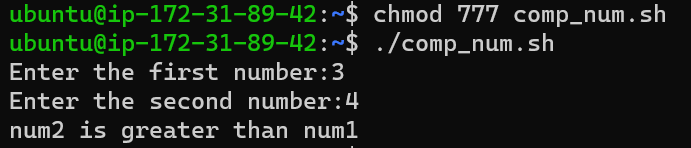
step 3: then execute the sample_file.sh using bash sample_file.sh or ./sample_file.sh(for this one needs to change the permissions of the file using chmod 777 sample_file.sh)



Write a Shell Script to take user input, input from arguments and print the variables.
Shell script to take user input

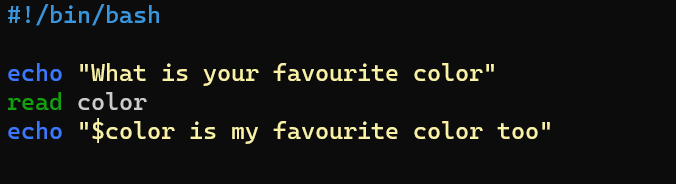

Note: Blue is the input that is given as input.
Input from arguments

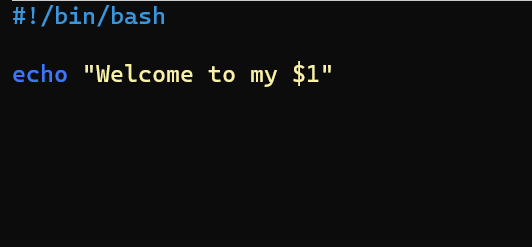

Note: Here $1 corresponds to World which is the argument that is given while executing the function. similarly if one wants to give two arguments they have to use $2 and give the second input argument along with the first input argument while executing.
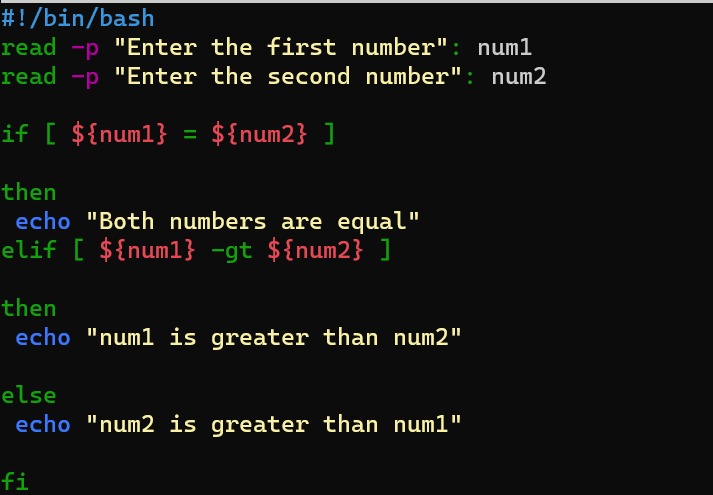
Write an Example of If else in Shell Scripting by comparing 2 numbers

🎉 Congratulations! 🎉
🚀 You've reached the end of our blog on Shell Scripting Basics.
💡 We hope this journey into the world of shell scripting has been enlightening and empowering.
🤖 Happy scripting! 🤖
#


